
Visibility on initiatives depends on the user's access profile as shown in the screenshot below:
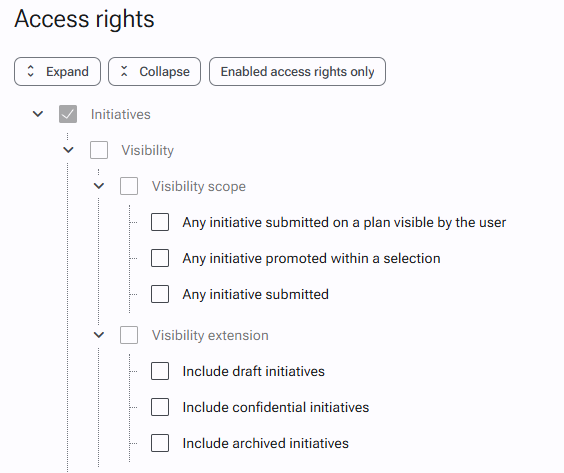
- If none of the above options are checked, only the initiatives in which the user is involved (Editor / Author / named Additional member) are visible.
- If you wish to restrict visibility to initiatives in one or more plans, select "Any initiative submitted on a plan visible by the user "; make sure that the concerned users are part of the scope (site, service, process or named users) of the desired plan(s).
- To share or highlight specific initiatives, added to a selection, you can check "Any initiative promoted within a selection". Initiatives submitted in closed selections (e. g. Trophies) or permanent selections (e. g. Good Practices) will then be visible regardless of their plan.
- If "Any initiative submitted" is checked then they can see all initiatives submitted except for draft, confidential and archived initiatives.
- Visibility on draft, confidential and archived initiatives must be enabled in addition to the previous rights. Meaning, if a user has "any initiative submitted on a plan visible by the user" + "include draft initiatives", he will see submitted and drafted initiatives linked to plans he has visibility on.
To change the visibility of initiatives on an access profile
- Go to the Administration > Users & Access Profiles > Access Profiles page.
- Open the file of the desired access profile.
- Click on the edit icon in the upper right corner..
- In the "Access rights" section, search for the right Initiatives > Visibility.
- Check or uncheck the appropriate right(s).
- Validate the changes by clicking on the "Save" button at the bottom of the form.