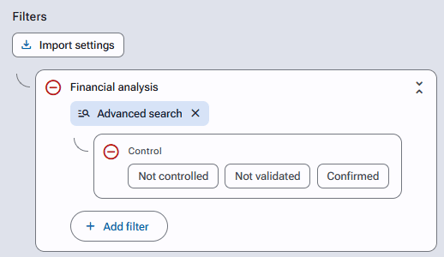
In the application, the financial analysis can be controlled calculation line by calculation line, or in its entirety, by users who have the following right:
"Initiatives / Initiative management / Analyze gains / Analyze and control amounts".
This right can be granted through "Access profiles" or through "Related accesses".
Line-by-line control of the financial analysis
After clicking on "Edit financial analysis", the controller can change the control status by clicking on the icons at the beginning of each line. Here are the 3 available statuses:
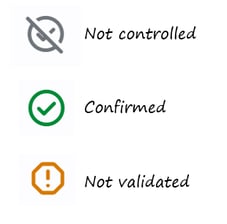
If a line has been controlled (confirmed or not validated), and then a user without control rights modifies that calculation line, the status automatically changes back to "Not controlled".
If a line has been controlled (confirmed or not validated), and then a user with control rights modifies that calculation line, the status remains unchanged.
Control of the entire financial analysis
After clicking on "Edit financial analysis", the controller can select the control status of the entire analysis in the "Control" dropdown menu.
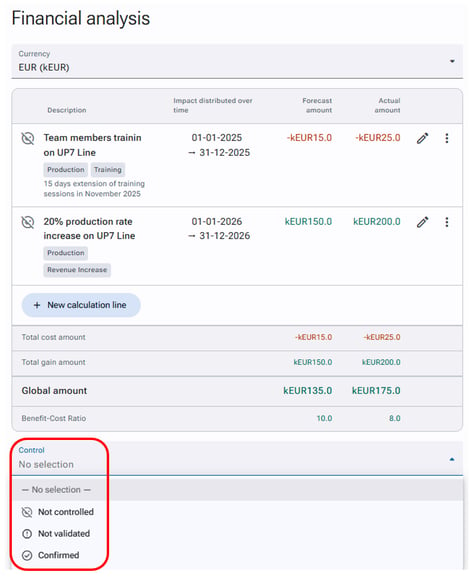
A banner indicating the control status of the entire analysis is then displayed:
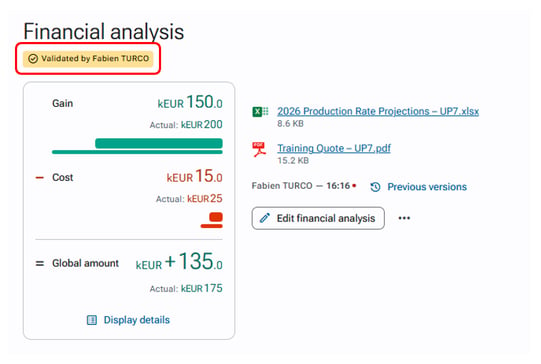
If the financial analysis has been controlled (confirmed or not validated), and then a user without control rights adds or modifies a calculation line, the status automatically changes back to "Not controlled".
If the financial analysis has been controlled (confirmed or not validated), and then a user with control rights adds or modifies a calculation line, the status remains unchanged.
Line-by-line control and full-analysis control are independent: validating or invalidating all the lines does not automatically set a status for the overall financial analysis!
Finding initiatives based on control status
Some users may find it useful to search for initiatives according to the control status of the financial analysis or calculation lines.
For example, if they want to filter their search by "Not controlled calculation lines":
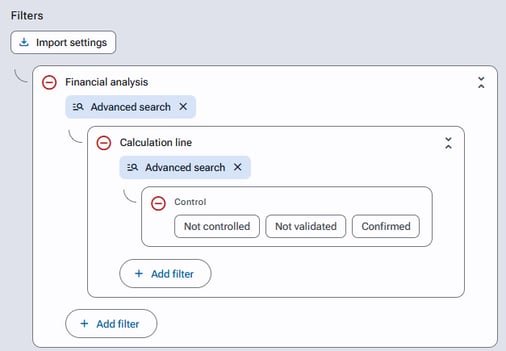
If they want to filter their search by "Not controlled financial analyses":