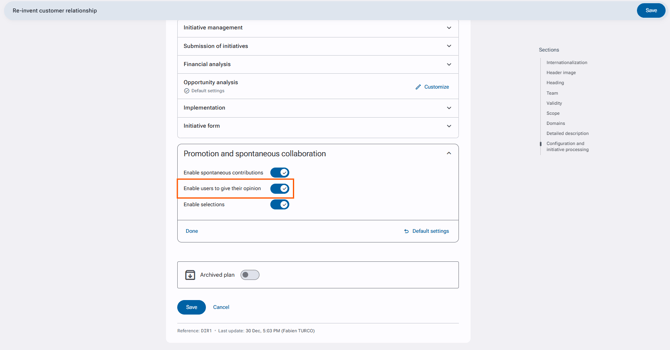
There are 2 conditions for a user to give an opinion:
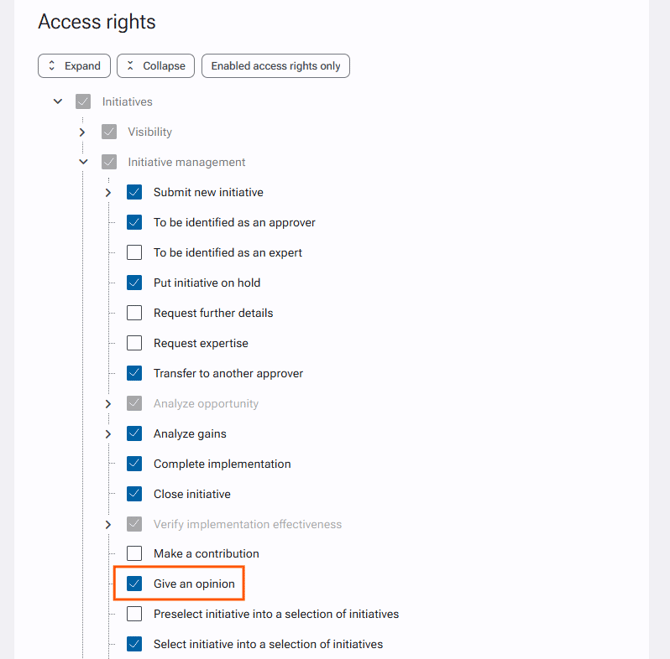
- He must have the right to express a view within one of his access profiles.
- The functionality must be activated on the plan.
To assign the right to an access profile
- Go to Administration > Users & Access profiles > Access profiles.
- Choose the desired access profile.
- In the "Access rights" section, search for the right Initiatives > Initiative management > Give an opinion.
- Select the "Give an opinion" right.
- Validate changes by clicking on the "Save" button at the bottom of the form.
To enable the right for initiatives by default
- Go to the Administration > Initiative management > Initiative management settings.
- In the "Promotion and spontaneous collaboration" section, choose the "Enable users to give their opinion" field.
- Validate changes by clicking on the "Save" button at the bottom of the form.
To enable the right on a specific plan
- Go to Administration > Plans & Domains > Plans.
- Open the plan's file to be modified.
- Click on the pencil on the upper right to edit the plan.
- In the "Promotion and spontaneous collaboration" section, uncheck the option "Use default configuration".
- Check the "Enable users to give their opinion" field.
- Validate changes by clicking on the "Save" button at the bottom of the form.