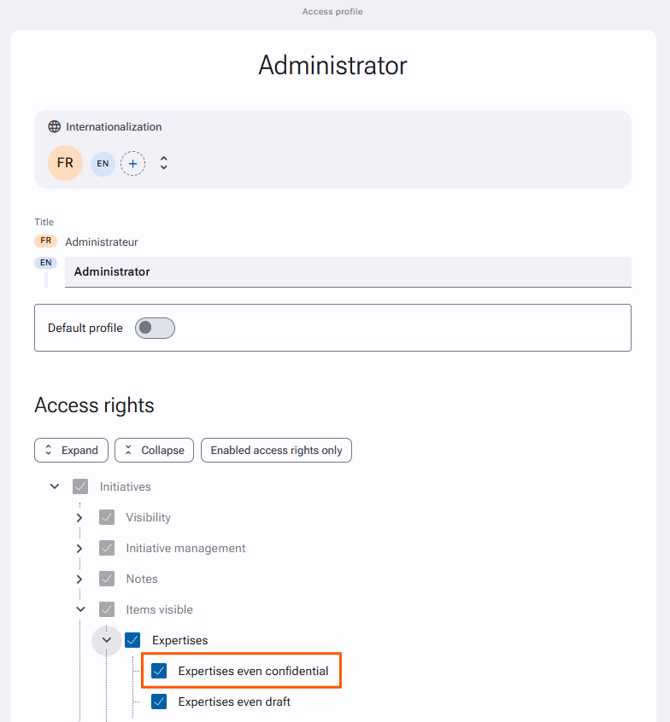
By default, only the approver of the initiative can access its confidential expertise. However, additional rights can be configured within the access profiles and related accesses.
Through the related accesses
- Go to Administration > Initiatives Management > Related Accesses page.
- In the chosen role, search Items visible > Expertises > Expertises even confidential.
- Check or uncheck the right if necessary.
- Validate the changes, if any, by clicking on the "Save" button at the bottom of the form.
Through the access profiles
In order to find profiles that have visibility rights:
- Go to the Administration > Users & Access Profiles > Access Profiles.
- Click on "New search" at the bottom of the page.
- In the search form, add a filter in "Access rights", select from the list Initiatives > Items visible > Expertises > Expertises even confidential.
- Click on "Search" at the bottom of the page.
The profiles displayed following the search have the right to see confidential expertises.
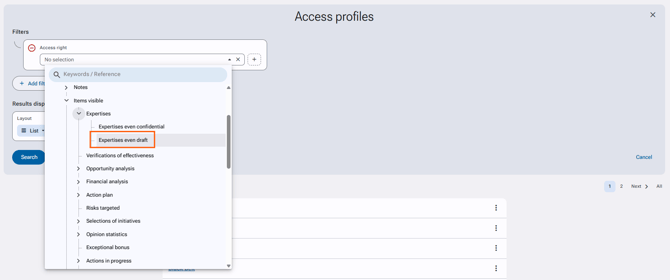
To provide or remove the visibility of confidential expertises to an access profile
- Go to the Administration > Users & Access profiles > Access profiles.
- Open the file for the desired access profile.
- Click on the pencil on the upper right to modify the profile.
- In the "Access rights" section, search for the right Initiatives > Visible elements > Expertises > Expertises even confidential.
- Check or uncheck the right.
- Validate the changes, if any, by clicking on the "Save" button at the bottom of the form.