
Available in Administration > Classification > Classes, classes make it possible to track the various areas of application/impact of initiatives (quality, environment, customer experience, digital, IT, sales, logistics, etc.).
Classes should generally answer the question: “What does the initiative contribute to?” An initiative can be associated with multiple classes.
The home page of the “Classes” section shows the number and list of classes. The quick action menu (three vertical dots) allows you, for one or several selected classes, to follow the classes, change the approver, or archive the classes.
In “Tree" layout, you can switch to “Edit mode” via the gear-shaped button to quickly create, delete, or modify classes.
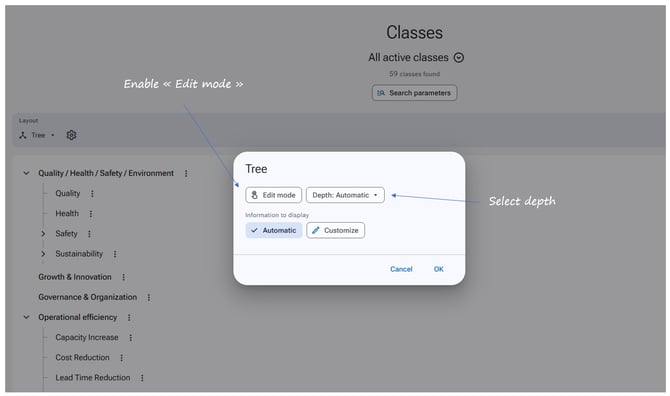
A class is defined by:
-
A title.
-
Optionally, a parent class.
-
A position in the tree structure.
-
An approver.
To create a class
-
Go to Administration > Classification > Classes.
-
Click "New" then "New class".
-
Fill in the different fields.
-
Click Save at the bottom of the page.
To integrate classes into the default initiative submission form*
-
Go to Administration > Initiative management > Initiative management settings.
-
In the “Submission of initiatives” section, make the “Classes” field available.
-
Click Save at the bottom of the page.
It is also possible to manage classifications directly by axis in the axis configuration.
Examples of classes:
-
Quality
-
Safety
-
Environment
-
New technologies / Digital transformation
-
Data
-
Artificial Intelligence
-
Internet of Things
-
Robotics
-
Information Systems
-
HR
-
Workplace well-being
-
Skills & Expertise
-
Collaboration / Cross-functionality
-
Employer branding
-
Corporate culture
-
Organization / Operational efficiency / Agility
-
Procurement
-
Products / Services
-
Customer satisfaction
-
Business development
-
International development
-
Production
-
Communication / Brand image / Awareness