Yes, it is possible to duplicate an initiative in IDhall.
This involves creating a new initiative in draft status, reusing all or part of the data from an existing initiative:
- Plans
- Header image
- Fields "Context (...)", "Description of the initiative", "Expected benefits"
- Scope
- Classification
- Risks
- Stakeholders
- Sponsor
- Financial controllers
- Additional members
- Opportunity analysis
- Financial analysis
- Implementation details
- Short translations
It is important to note that initiative duplication does not include:
- Reviews
- Contributions
The right to duplicate an initiative must be enabled in your access profile via the page:
Administration > Users & Access Profiles > Access Profiles.
First, click on the three dots to the right of the relevant access profile, then click "Edit".
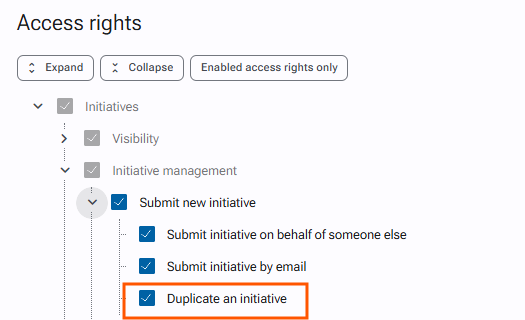
Check the permission Duplicate an initiative located in:
Initiatives > Initiative management > Submit new initiative > Duplicate an initiative, then save the changes.
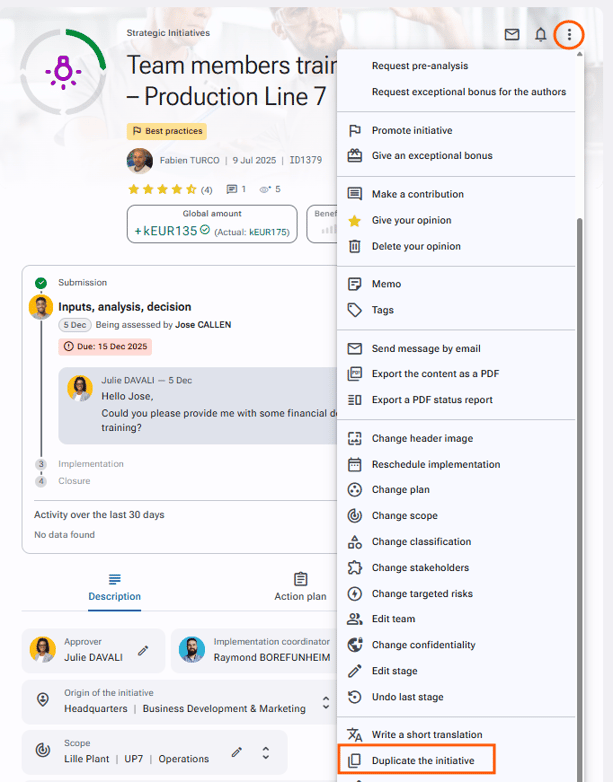
Go to the initiative form you want to duplicate and click the options button at the top right of the page.
Then, at the bottom of the dropdown list, click "Duplicate initiative".