
The incentive program enables the reward of the involvement of users with an allocation of points, potentially convertible into currency, and/or badges. Indeed, the application allows you to manually or automatically award points to your users. For Automatic allocation, you can define a number of point to gain for each of the following actions:
- Submit a new initiative (this helps celebrating the proposition of a new initiative)
- Have an initiative approved (this should be more rewarded than the latter, as it means proposing an initiative seen as interesting and feasible for the company)
- Have an initiative closed with success (third level, an initiative proposed and approved was led to success, adding value to the company)
- Expertise an initiative (this can award points to experts)
- Approve an initiative (this to award points to approvers)
- Have successfully implemented an initiative closed with success (allows to thank implementation coordinators)
- Make a contribution
This assignment can be configured at Administration > Incentive program > Incentive program settings.
Management of the incentive program is only available if the “Incentive program” module is activated.
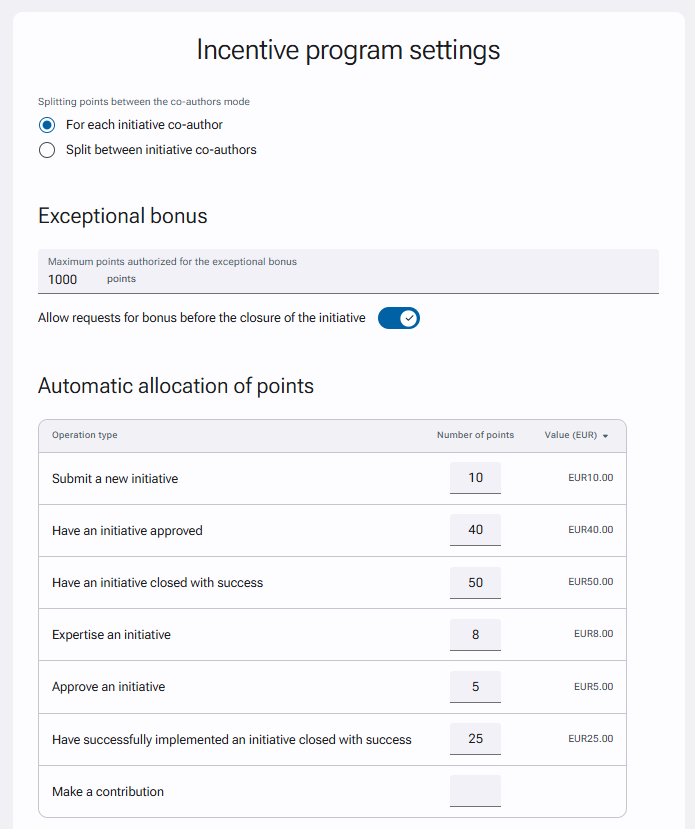
For each action, define a number of points that will be given. These points can be transformed into a monetary value by defining a countervalue of the points.