The request for further details is a feature that can be made available to a designated approver*.
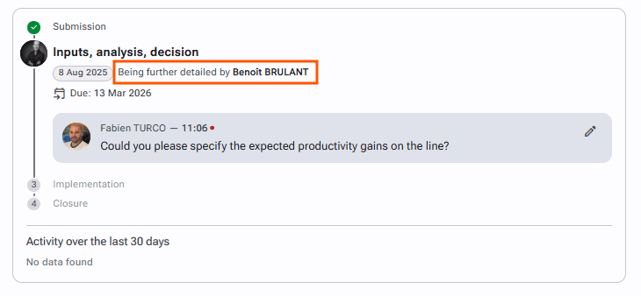
This feature is used to “send back” the initiative file to its author if the approver considers that the initiative is not detailed enough for a decision to be made. This request changes the status of the initiative from “Awaiting decision” to “Being further detailed by [the author]”.
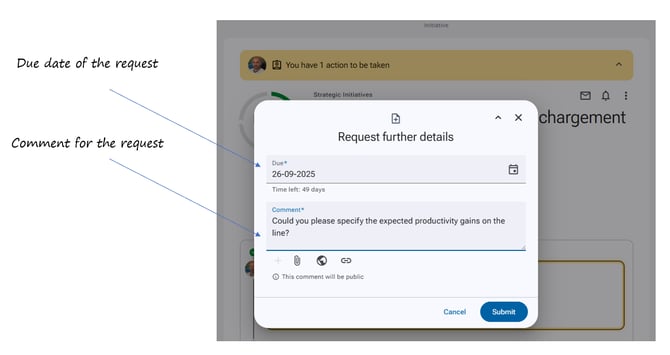
When making a request for further details, the approver must set a due date (the time allowed for the author to review and complete the initiative) and add a mandatory comment. The comment should explain in what way the initiative is incomplete so that the author knows how to improve it.
This request is automatically sent to the author of the initiative.
To request further details
-
Go to the initiative file.
-
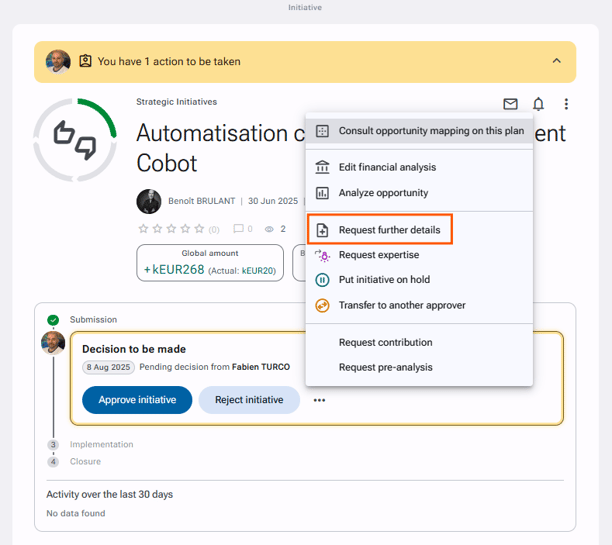
Click “Request further details” via the actions button at the top right, or by clicking the three horizontal dots to the right of “Reject the initiative”.
-
Fill in the form by specifying the due date and the details of the requested improvements.
-
Click “Submit”.
Required permission: Relative accesses > Approver > Request further details