Promoting an initiative allows you to highlight your collaborators’ initiatives on various themes, such as awards, best practices, remarkable initiatives, etc.
IDhall allows you to:
-
Pre-select initiatives pending future promotion, which will be carried out by authorized users.
-
Directly promote an initiative in a selection without going through the pre-selection process.
To promote an initiative
-
Open the initiative file.
-
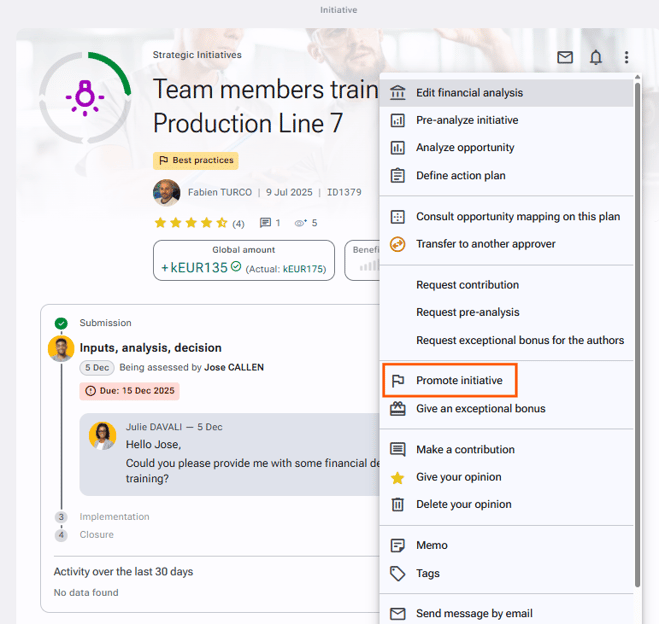
Click the actions button and select “Promote initiative”.
-
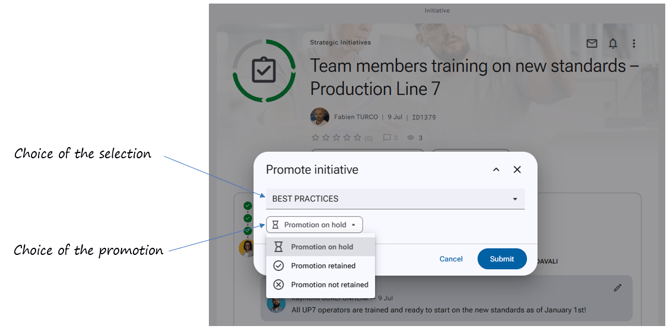
Choose the desired selection from the drop-down menu*.
-
Decide whether the promotion status should be “on hold”, “retained”, or “not retained”.
-
Click “Submit”.
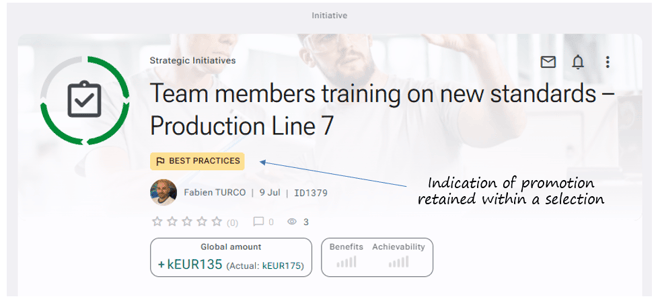
When an initiative is selected within a selection, a banner with the name of the chosen selection will appear under the title of your initiative.
At least one selection must be defined in IDhall in order to categorize the initiative.