IDhall allows you to add tags to initiatives in order to have a semi-structured personal "classification". These tags are not visible to other users. Tags can be used to create your own selections of initiatives.
To add tags to an initiative
- Go to the initiative file.
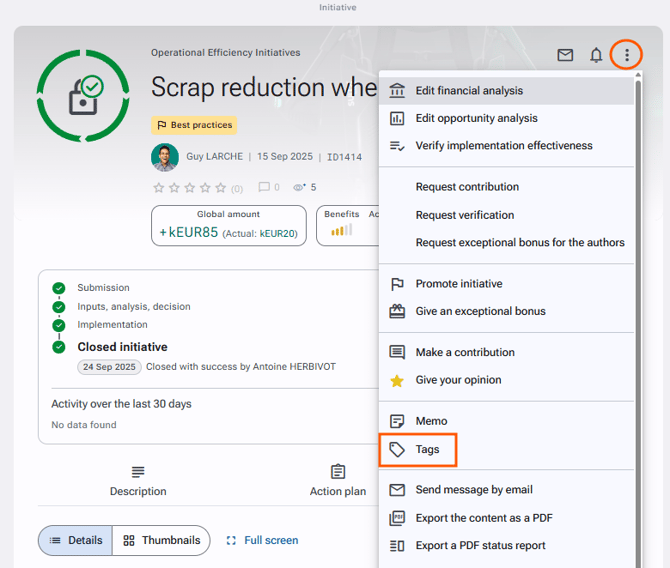
- Click on "Tags" via the action button on the upper right.
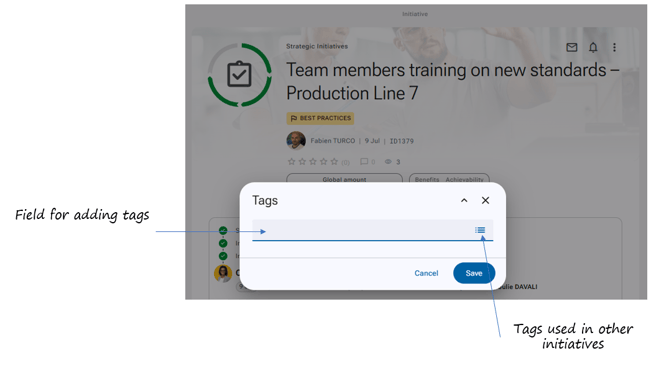
- Indicate the different tags to be assigned to the initiative in the dialog window, you can also view the tags used on other initiatives by clicking on the horizontal bars to the right of the dialog window.
- Click on "Save".
Press the "space" key between each tag to assign multiple tags to your initiative.To find the tags you have assigned, see our article "How to find the list of tags I have assigned to initiatives".